

Business security audit checklist for access and employee readiness
A security policy can look sound on paper while access and reporting procedures fall short in practice. A business security audit checklist turns the review into clear, checkable steps: gather information about your security measures, test how they work and record any gaps. Cover who can enter your premises and systems, how passwords and multi-factor authentication are managed, what employees know about security risks and how incidents are reported.
It’s reasonable to want a straightforward way to see what’s working and what needs attention. This guide explains how to review key areas, spot weaknesses and document findings so they lead to practical action. It also shows how physical security measures and employee readiness fit into a wider review.
Key Takeaways
- Build an inventory of business devices, software and data, then track updates and unresolved vulnerabilities.
- Review who can access premises and systems, remove outdated permissions, and check that passwords and multi-factor authentication are applied consistently.
- Make sure employees know how to recognise suspicious messages and report security concerns promptly.
- Record audit findings, evidence and follow-up actions so identified gaps lead to practical improvements.
What is a security audit checklist?
A security audit checklist is a structured record of the assets, policies and controls a business reviews. An internal audit is conducted by the business; an external audit is conducted by an outside party. A penetration test actively probes systems for exploitable weaknesses, while a vulnerability scan uses specialised software to identify and report potential weaknesses.
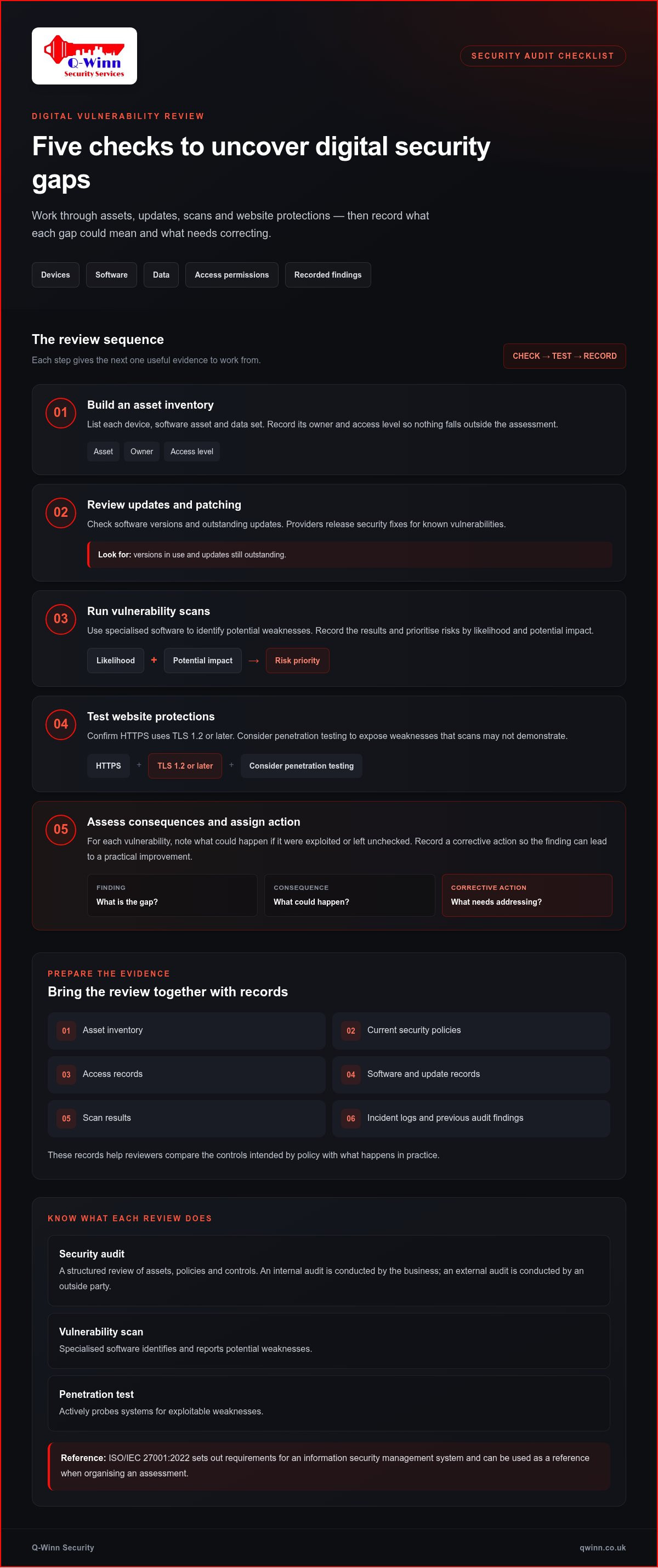
A business security audit checklist should cover devices, software, data, access permissions, security measures and recorded findings. Use these checks to assess digital vulnerabilities:
- Inventory devices, software and data. Record each asset, its owner and access level so nothing falls outside the assessment.
- Review updates and patching. Check software versions and outstanding updates because providers release security fixes for known vulnerabilities.
- Conduct vulnerability scans. Run specialised software to identify weaknesses, then record findings and prioritise risks by likelihood and potential impact.
- Test website protections. Confirm HTTPS uses TLS 1.2 or later, and consider penetration testing to expose weaknesses scans may not demonstrate.
- Assess the consequences of gaps. Note what could happen if each vulnerability were exploited or left unchecked, then assign corrective actions.
Prepare the asset inventory, current security policies, access records, software and update records, scan results, incident logs and previous audit findings. These documents help reviewers compare intended controls with actual practice. ISO/IEC 27001:2022 sets out requirements for an information security management system, according to the International Organization for Standardization; businesses can use it as a reference when organising their assessment.
Reviewing access controls, passwords and multi-factor authentication
Review access control across premises, business systems and shared areas. Compare permissions with each person’s current role, then remove former employees’ and unused accounts. Set a clear process for assigning and revoking privileges during onboarding and offboarding. These checks can expose weaknesses before an account or key is misused.
- Check staff access. Confirm permissions match job duties, and review screening and reference-check procedures for new starters.
- Inspect premises controls. Test door and window locks, check keyholder records, and make sure lost keys or cards can be addressed promptly.
- Review visitor measures. Use picture ID badges, record visitors, escort guests to meetings and provide guest Wi-Fi separate from the business network.
- Audit passwords and MFA. Cyber Essentials Requirements for IT Infrastructure version 3.3 specifies passwords of eight characters when MFA is used. The same requirements recognise FIDO2 authenticators and passkeys; the NCSC accepts SMS but recommends stronger methods.
- Check cloud access. Under version 3.3, a cloud service without MFA fails assessment when MFA is available. Review software settings and document any access-control gaps.
For assessment accounts created from the end of April 2026, Cyber Essentials Requirements for IT Infrastructure version 3.3 applies. Record evidence of MFA settings, account reviews, keyholder updates and visitor procedures. Include emergency plans: keep exits clear and ensure they open from inside, so access measures don’t obstruct evacuation.
Where premises access includes keys and alarm response, key holding and alarm response can support a defined physical security process.
Employee security awareness and incident reporting
Train every employee during onboarding, then revisit security policies as practices or threats change. Show staff how phishing emails and convincing phone calls can expose passwords or business data. Phishing simulations can test whether employees recognise suspicious messages and know how to report them.
UK businesses handling personal data should consider GDPR and the Data Protection Act 2018 in their security assessment. Document the policies, responsibilities and incident response procedures used to protect personal information.
- Test reporting knowledge. Ask employees how they would report a lost device, suspicious link or unexpected request for access.
- Review insider risks. Check whether access and activity records reveal unusual behaviour, including unauthorised data access or policy breaches.
- Practise response steps. Give employees a clear route to report incidents, identify who receives reports and explain how the response is escalated.
- Repeat and record training. Keep attendance and exercise findings, then update materials when audits identify gaps or business practices change.
Assess awareness through short interviews, training records and simulation results. Consider both human error and deliberate misuse, such as a disgruntled employee accessing information beyond their role. Regular reviews help identify whether employees understand the network rules and reporting structure. A security audit checklist can record gaps and assign follow-up actions. Phishing remains a practical test: 57% of organisations experience phishing attacks at least weekly or more often.
For incidents involving a premises alarm, use key holding and alarm response as part of the site’s physical response arrangements.
Q-Winn Security: Key Holding & Alarm Response
Q-Winn Security can support the physical security measures identified in your audit with Key Holding & Alarm Response. This service is relevant when findings point to a need for secure key holding or a defined response to alarm activations at your Bracknell premises.
For other site requirements, Mobile Patrol can provide scheduled and random site checks, while Lock-Up & Unlock Services support controlled opening and closing routines. Static / Manned Guarding may suit premises that need an on-site security presence. These services address physical site security, not cyber vulnerabilities, password controls or employee training.
Use your audit findings to identify the practical requirement: alarm response, patrols, opening and closing, or on-site guarding. A clear scope helps connect the security arrangement to the risks recorded in your assessment. Visit Q-Winn Security to discuss your premises security requirements.
Put your audit findings into action
Assign an owner to each priority, record the action taken and set a review point. This makes a business security audit checklist a practical part of daily operations. Start with gaps that could affect people, property or essential routines, then keep evidence of completed changes.
Where findings concern physical site security, Q-Winn Security offers Key Holding & Alarm Response, Mobile Patrol and Lock-Up & Unlock Services. These can support your premises arrangements, alongside the access controls and employee practices managed within your business.
Discuss your site requirements and possible next steps with Q-Winn Security. A clear plan helps you move forward with greater confidence.
Frequently Asked Questions
How does an audit work?
An audit compares what your security procedures require with what happens in practice. The reviewer defines the scope, examines records, observes relevant processes and speaks with staff. For example, they might compare a site’s visitor log with its sign-in procedures. Findings should identify the evidence, the weakness and the corrective action, giving managers a clear basis for decisions.
What can you do about it?
Turn each finding into a manageable action. Record its priority, appoint an owner and set a target for completion. For example, if visitors aren’t consistently signed in, revise the reception process and brief the people responsible. Keep evidence of the change, such as an updated procedure or training record, then review whether it has addressed the original gap.
How do you conduct a step-by-step business security audit?
Start by setting the audit’s scope and gathering relevant records. Walk through the workplace, observe how procedures operate and ask staff to explain their roles. Compare what you observe with written policies, then record evidence and gaps. Assess each finding by likelihood and impact, assign corrective actions and schedule a follow-up review to check progress.
How should businesses audit physical security, access controls, alarms and CCTV?
Inspect the site during normal working conditions and opening or closing routines. Check that doors and windows operate properly, access logs match authorised entry and alarm procedures are understood. For existing CCTV, verify that cameras are online and footage can be retrieved for a relevant time. Record faults, affected areas and who will arrange the appropriate corrective work.
How should a business identify, rate and prioritise security risks?
Describe each risk as a possible event, its cause and its business consequence. Rate likelihood and impact using consistent labels, such as low, medium or high, and explain the evidence behind each rating. Prioritise risks that could cause serious harm or disrupt essential operations. Assign an owner and revisit ratings when controls or working practices change.
Frequently Asked Questions
An audit compares what your security procedures require with what happens in practice. The reviewer defines the scope, examines records, observes relevant processes and speaks with staff. For example, they might compare a site’s visitor log with its sign-in procedures. Findings should identify the evidence, the weakness and the corrective action, giving managers a clear basis for decisions.
Turn each finding into a manageable action. Record its priority, appoint an owner and set a target for completion. For example, if visitors aren’t consistently signed in, revise the reception process and brief the people responsible. Keep evidence of the change, such as an updated procedure or training record, then review whether it has addressed the original gap.
Start by setting the audit’s scope and gathering relevant records. Walk through the workplace, observe how procedures operate and ask staff to explain their roles. Compare what you observe with written policies, then record evidence and gaps. Assess each finding by likelihood and impact, assign corrective actions and schedule a follow-up review to check progress.
Inspect the site during normal working conditions and opening or closing routines. Check that doors and windows operate properly, access logs match authorised entry and alarm procedures are understood. For existing CCTV, verify that cameras are online and footage can be retrieved for a relevant time. Record faults, affected areas and who will arrange the appropriate corrective work.
Describe each risk as a possible event, its cause and its business consequence. Rate likelihood and impact using consistent labels, such as low, medium or high, and explain the evidence behind each rating. Prioritise risks that could cause serious harm or disrupt essential operations. Assign an owner and revisit ratings when controls or working practices change.